


Which interior suits you?
We offer a wide range of interiors, and each one gives you a unique way to present your printed menu. Pick a fixing to see how it works, which sizes it comes in, and how to change your pages.

Cord Only
A great option if you print on high quality paper or change your menu often.
Simply slide your paper inserts under the tag cord, which holds them in place.
- Holds pages by
- Tag cord
- Sizes
- A4, Slim, A5, 1/2 A4, Square, 1/3 A4
- Best for
- Quality paper, frequent changes

PVC Pockets
Strong PVC pockets give you a more robust interior that is easy to maintain and simply wipes clean.
Showing up to 24 sides of paper, PVC pockets are a great choice for larger menus.
- Sides to show
- Up to 24
- Sizes
- A4, Slim, A5, 1/2 A4, Square, 1/3 A4
- Holds pages by
- Clear PVC pockets
- Best for
- Larger menus, easy cleaning
Border Frames
Add a level of sophistication with elegant, stitched synthetic inserts that raise the level of any menu.
Inserts change quickly from the top opening and are held securely behind a page protector.
- Sides to show
- Up to 4
- Sizes
- A4, Slim
- Holds pages by
- Stitched frame + page protector

Corner Mounts
High quality laminated card inserts, held in place by a tag cord.
Four corner cut-outs make changing your menu easy, and a page protector prolongs the life of your inserts.
- Sides to show
- Up to 8
- Sizes
- A4, Slim, A5
- Holds pages by
- Corner cut-outs + page protector

Fixed Interiors
A stylish option built into the inside covers of the menu, available in a wide range of fabrics and colours.
Paper is held in place with corner cut-outs and supplied with page protectors. Showing 2 sides, fixed interiors suit a more selective menu.
- Sides to show
- 2
- Sizes
- A4, Slim, A5, 1/2 A4, Square
- Holds pages by
- Corner cut-outs + page protectors

Gatefold
A unique, modern option with 3 fixed display panels as standard.
All the benefits of a fixed interior, with a centre display twice the size of the smaller 'wing' panels.
- Panels
- 3 fixed panels
- Sizes
- A4 portrait, A4 landscape, Square
- Layout
- Centre panel 2× the wings

Post Fix
A great option if you're looking for something a little different.
Inserts are held through an internal spine with 2 or 4 screws. Screws come in 6mm and 10mm lengths, in black, gold or silver.
- Spine
- Internal, 2 or 4 screws
- Screws
- 6mm or 10mm · Black, Gold, Silver
- Sizes
- A4, Slim, Square, A5

Screw Fixing
Your hole punched inserts are held in place in an external spine with 2 or 4 screws.
Screws come in two lengths, 6mm or 10mm, and are available in black, gold or silver.
- Spine
- External, 2 or 4 screws
- Screws
- 6mm or 10mm · Black, Gold, Silver
- Inserts
- Hole punched
- Sizes
- A4, Slim, Square, A5 · portrait or landscape

Side Fixing
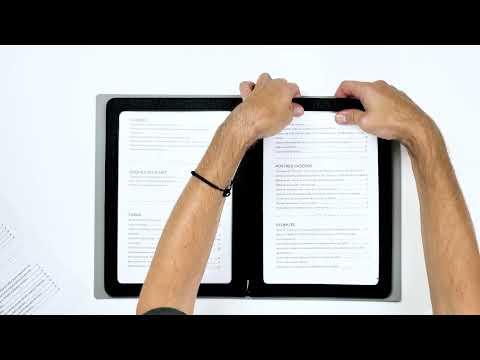
A neat, simple interior for A4 menus, showing up to 4 sides.
Play the video to see how quickly the paper can be changed.
- Sides to show
- Up to 4
- Sizes
- A4 only
Compare every fixing
*Maximum sides to show depend on your paper thickness and the menu's spine. Not sure what your cover allows? Ask our team.
Print to the right size
Paper sizes in millimetres, drawn to scale. Click a size to shop menu covers in that size.
Shown to scale · sizes are the paper insert
What does "sides to show" mean?
Sides to show is the number of pages of information a menu or folder can hold. Your pages are held securely inside the menu using clear plastic wallets, border frames or corner mounts.
An insert stretches right across the menu, held in at the spine by a tag fastening, and holds four pages of information back to back. Each menu has a maximum number of sides to show, set by the thickness of the spine and the type of fixing used.
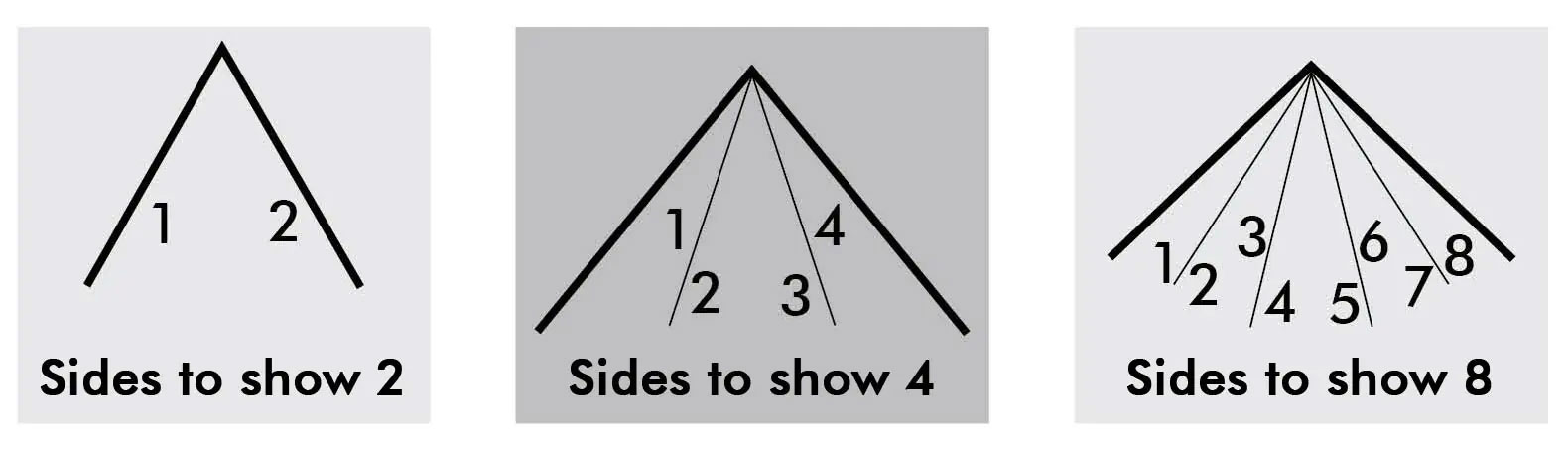
 Watch · Sides to show explained
Everything you need to get it right
From choosing the right fixing to meeting the people behind your menus, explore our guides and see how we work.
Menu covers & holders
Complete the look with menu covers, holders and boards made to match your venue.
Shop menusMenu case options
Compare wall-mounted, floor-standing and window cases to find the right display for your venue.
Compare casesPersonalisation
Discover the ways we can add your logo and branding to make every piece unmistakably yours.
See optionsTalk to us
A bespoke project or unsure about a finish? Our team is on hand by phone or email.
Contact usOur design team
Need artwork or a fresh layout? Our in-house designers are here to help bring your ideas to life.
Meet the teamLearn about Menu Shop
A family business with over 30 years' experience. Discover our story and the team behind every order.
Our storyProud to supply
From independent cafés to household names, see some of the clients who trust Menu Shop.
View our clients





Still not sure which fixing suits you?
If you have any further questions or need a hand choosing, please don't hesitate to get in touch.